
Demo
Hardware
Consists of two USB Web Cameras connected one next to another:
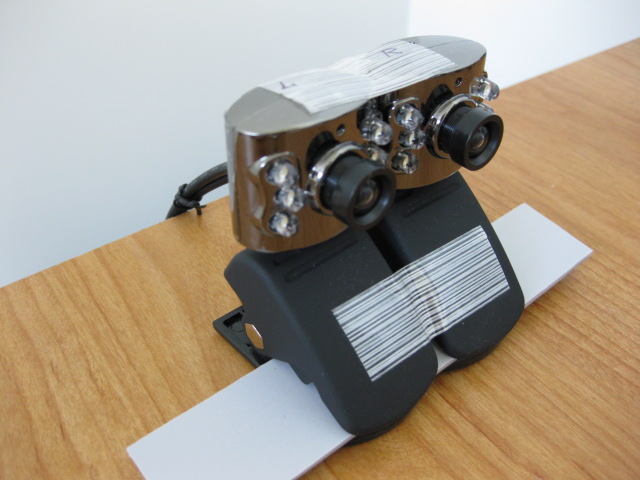
Software
Source code available here:
http://code.google.com/p/opencvstereovision/source/browse/#svn/trunk
Requirements:
– QT SDK http://www.qtsoftware.com/downloads
– OpenCV Library (* At the time of this article I was using Version 1.1pre1, October, 2008)
Once you have instaleld the libraries and downloaded the code open OpenCV-Qt-StereoVision.pro in QT Creator.
Update the paths to where your OpenCV library is installed (replace every occurrence of C:\SDK\OpenCV\ to the path where you installed OpenCV).
It is assumed that you have 2 USB cameras connected to your PC and there are no other cameras connected to computer. If this is not the case then you might want to have a look at StereoCamera::setup() in stereocamera.cpp.
It is assumed your cameras can capture 640×480 images.
If you don't have the cameras yet, but would like to test the sofware using the included images sets (see /images/ folder). Open mainwindow.cpp and comment out timer.start(50); while uncommenting one of the 2 lines:
//stereoVisionTest("../images/set1/",7,4); //run test1
//stereoVisionTest("../images/set2/",9,6); //run test2
If you get any compiler errors make sure your Qt and OpenCV libraries are installed correctly. For that matter try to create a new test QT project and make sure it compiles.
Calibration
Before your cameras can see in 3D you need to perform a calibration sequence.
– print out the following PDF : ChessBoard – Stereo Calibration.pdf and tape it to a solid piece of wood, plastic or fiber glass (make sure the image is not bent or calibration will not work).
– focus your cameras so that the text on the chessboard is readable, make sure you don't modify the focus of cameras after calibration or during calibration since the focus is an important factor in calibration .
– start calibration by clicking on Start Calibration button in software, place the chessboard in front of the cameras so that it is completely visible in both cameras.
-software will take samples every 5 seconds , until the specified number of samples has been taken (10 by default).
-once calibration is complete click "Save Calibration" to save calibration data to a file (calibration will be reloaded next time you start the program automatically).
-if you modify position or focus of cameras you will need to calibrate.
-pay attention to 'rectified' image , if a line intersects an object or a spot on the left image it should intersect same object or spot on the right image. This is an indicator that your calibration is correct.
-if you have valid calibration data you should see the normalized depth image in the "Depth" window
IMPORTANT UPDATE July 3, 2010:
Updated code to work with OpenCV-2.0.0a-win32.exe (will no longer work with older versions, unless you modify the .pro file, to include ther proper libraries and include paths).
//starlino//
Hi,
A question about Qt. I can’t get your program to compile because I get this:
“d:\qtstereovision\stereocamera.h:8: error: Cannot open include file: ‘vector.h’: No such file or directory”
I am using Qt Creator with Qt 4.5, Windows Vista. I have compiled qt programs with the visual studio integration before, but haven’t tried qt Creator alone.
Vector.h is part of STL. It is disributed with QT (4.5) , mine is at this location:
C:\Qt\2009.02\mingw\include\c++\3.4.2\backward\vector.h
If you don’t have it then check installation options.
(You will get a backward warning when compiling with this file ).
Thank you for sharing your project. I have also been trying to get the calibration work with little effort, maybe because I didn’t use a solid surface. Anyway, if OpenCV is installed in a path with sapces, like “Program Files” QT doesn’a accept it. I had to copy the contents of C:\Program Files\OpenCV to C:\SDK\OpenCV, then it worked.
1)
Did you try enclose paths with spaces in quotes ?
2)
For calibration to work use the PDF file supplied and attach it to a solid board. Use good light conditions (daylight is the best). Make sure your cameras are focused.
IMPORTANT:
Make sure you did not switch left and right camera.
How to check ?
The screen with the Right camera should have objects on the right that are not on the Left camera (i.e. image is shifted to the right relative to the left camera). Similar the screen with the Left camera should show an image shifted to the left relative to the right camera. If you got it wrong , just switch the USB ports where the cameras are conencted and restart application.
I saw your video on the stereo-vision project you have done and I must say that it is definitely impressive. I am working on a similar project with opencv but everytime i try and capture the stream from the two cameras, i get an error saying that the cameras have exceeded the usb bandwidth. Did you have such a problem when implementing your system and do you think you could help me figure out a solution to this problem?
I would really appreciate your help in this. Thanks heaps in advance.
I dont think the exceeded bandwidth problem has anything to do with Qt or OpenCV it’s more of a Windows/Hardware problem. You might be using a low speed hub , depending on your computer some USB ports may also be internally connected to the same hub. Try using the back USB ports instead. Try different combinations.
To troubleshoot this you can use USBDeview utility
http://www.nirsoft.net/utils/usb_devices_view.html
scroll all the way to the right and you’ll see the Hub / Port column.
Make sure no other devices are connected to the same hub
Also try to adjust your camera frame rates (decrease it), you cameras might have their own dedicated control panel, or try window’s Control Panel > Scanners and Cameras.
While you at it you might want to adjust your resolution to 640×480.
//starlino//
Hello,
I downloaded the code from code.google.com project. I had installed opencv and QT SDK on windows Xp. I tried to compile the code i am getting these errors. I am first time user of QT. So please help me out to make it run. the compiler output is as given bellow.
Running build steps for project OpenCV-Qt-StereoVision… header for the header for C++ includes, or instead of the deprecated header . To disable this warning use -Wno-deprecated.
Configuration unchanged, skipping QMake step.
Starting: C:/Qt/2009.04/mingw/bin/mingw32-make.exe -w
mingw32-make: Entering directory `C:/Documents and Settings/mukesh.kumar/Desktop/opencvstereovision’
C:/Qt/2009.04/mingw/bin/mingw32-make -f Makefile.Debug
mingw32-make[1]: Entering directory `C:/Documents and Settings/mukesh.kumar/Desktop/opencvstereovision’
g++ -c -g -frtti -fexceptions -mthreads -Wall -DUNICODE -DQT_LARGEFILE_SUPPORT -DQT_DLL -DQT_GUI_LIB -DQT_CORE_LIB -DQT_THREAD_SUPPORT -DQT_NEEDS_QMAIN -I’../../../../Qt/2009.04/qt/include/QtCore’ -I’../../../../Qt/2009.04/qt/include/QtGui’ -I’../../../../Qt/2009.04/qt/include’ -I’../../../../SDK/OpenCV/cxcore/include’ -I’../../../../SDK/OpenCV/cv/include’ -I’../../../../SDK/OpenCV/cvaux/include’ -I’../../../../SDK/OpenCV/otherlibs/highgui’ -I’../../../../Qt/2009.04/qt/include/ActiveQt’ -I’debug’ -I’.’ -I’../../../../Qt/2009.04/qt/mkspecs/win32-g++’ -o debug/stereovision.o stereovision.cpp
In file included from C:/Qt/2009.04/mingw/bin/../lib/gcc/mingw32/3.4.5/../../../../include/c++/3.4.5/backward/vector.h:59,
from stereovision.h:8,
from stereovision.cpp:1:
C:/Qt/2009.04/mingw/bin/../lib/gcc/mingw32/3.4.5/../../../../include/c++/3.4.5/backward/backward_warning.h:32:2: warning: #warning This file includes at least one deprecated or antiquated header. Please consider using one of the 32 headers found in section 17.4.1.2 of the C++ standard. Examples include substituting the
stereovision.cpp: In member function `int StereoVision::calibrationEnd()’:
stereovision.cpp:127: error: `CV_CALIB_SAME_FOCAL_LENGTH’ was not declared in this scope
stereovision.cpp:127: error: `cvStereoCalibrate’ was not declared in this scope
stereovision.cpp:130: error: `cvUndistortPoints’ was not declared in this scope
stereovision.cpp:150: error: `cvStereoRectifyUncalibrated’ was not declared in this scope
stereovision.cpp:169: error: `cvInitUndistortRectifyMap’ was not declared in this scope
stereovision.cpp:127: warning: unused variable ‘CV_CALIB_SAME_FOCAL_LENGTH’
stereovision.cpp:127: warning: unused variable ‘cvStereoCalibrate’
stereovision.cpp:150: warning: unused variable ‘cvStereoRectifyUncalibrated’
stereovision.cpp: In member function `int StereoVision::stereoProcess(CvArr*, CvArr*)’:
stereovision.cpp:190: error: `CvStereoBMState’ was not declared in this scope
stereovision.cpp:190: error: `BMState’ was not declared in this scope
stereovision.cpp:190: error: `cvCreateStereoBMState’ was not declared in this scope
stereovision.cpp:199: error: `cvFindStereoCorrespondenceBM’ was not declared in this scope
stereovision.cpp:202: error: `cvReleaseStereoBMState’ was not declared in this scope
stereovision.cpp:190: warning: unused variable ‘CvStereoBMState’
stereovision.cpp:190: warning: unused variable ‘cvCreateStereoBMState’
stereovision.cpp:199: warning: unused variable ‘cvFindStereoCorrespondenceBM’
stereovision.cpp:202: warning: unused variable ‘cvReleaseStereoBMState’
mingw32-make[1]: Leaving directory `C:/Documents and Settings/mukesh.kumar/Desktop/opencvstereovision’
mingw32-make: Leaving directory `C:/Documents and Settings/mukesh.kumar/Desktop/opencvstereovision’
mingw32-make[1]: *** [debug/stereovision.o] Error 1
mingw32-make: *** [debug] Error 2
Exited with code 2.
Error while building project OpenCV-Qt-StereoVision
When executing build step ‘Make’
Thanks & Regards
Mukesh Kumar
http://forum.genericembedded.com
Can you tell me what drivers you used for the webcams ? I have the same cams but can’t get them to work simultaneously with openncv 2.0 .. thnx
You should ask the Ebay seller for drivers.
Try these drivers http://www.colordrives.net/ : LED 350K webcam driver (however I can’t guarantee they will work with your cameras).
Hi,
Have you had any problems with the results of the calibration? I am using cvStereoCalibrate and both my translation and rotation matrices are far from the correct position. Not very far, but are not precise enough. Do you have any advice on how to improve the calibration?
Thanks.
Ricardo,
Small deviation will always be present due to the camera distortion model not matching the real world distortion. you can read more about this in the opencv book see the right column. Even with this you can improve calibration results by:
– ensuring good lightning
– increase image contrast. See if you can find settings on your computer to increase camera contrast during calibration.
– focus the camera well , the text on the board should be readable
– changing focus after calibration will void calibration, moving camera position after calibration relative to the other camera will void calibration so make sure your rig is rigid enough. avoid cameras with auto-focus
– make sure samples you take are different, i.e. rotate the board , move it a little bit further or closer to the camera.
– try more or less samples count for the calibration, too few samples might not be representative, too many samples may result in over-fitting.
Well this is what I can think of so far. Let me know how it goes.
Hello,
I must admit your work is so interesting for those of us who are starting in this issue. But I have an aspect from above which is not very clear for me and it concerns to the focus of the camera. What is the influence of the focus in the calibration parameters? Focal length shouldn´t change and rotation and translation vectors neither…My question arise since I am choosing the cameras for my stereo system and I don´t know if they could have auto-focus (and therefore, easier to implement …). Thank you so much in advance.
Fernando ,
Focusing will change the distance between the center of the lens and the projection plane (the sensor). Although this variation might seem relatively small, from my experience it is enough to void the calibration. I would be interested in your results if you choose to use auto-focusing cameras, although my intuition would say that auto-focusing would introduce and extra unknown and unstable factor into the system.
Hi,
C:/Dokumente und Einstellungen/WSUSUpdateAdmin/Eigene Dateien/stereo_calib/stereocamera.h:8: from stereocamera.h:8
I have the file vector.h in my Qt folder but the error still appears everytime i compile. Any idea how solve this issue?
And when the programme runs, the error “connecting to cameras…failed” appears in the plainTextEdit. I have checked that both of my logitech cams are working perfectly fine.
Enoch: There’s a warning regarding vector.h (it it’s not an error than it’s fine). I am assuming it was a warning since you were able to run the application.
Maybe your cameras have a different index, try this utility and see where are your cameras detected (look under Devices menu).
http://noeld.com/programs.asp?cat=video
The demo code assumes you only have only 2 cameras in your system (but often times there are other devices , i.e. it might be your built-in laptop camera , or some virtual devices).
If your cameras appear at 2-nd and 3-rd position for example , then update this in stereocamera.cpp
captures[0] = cvCaptureFromCAM(CV_CAP_DSHOW + 0);
captures[1] = cvCaptureFromCAM(CV_CAP_DSHOW + 1);
to
captures[0] = cvCaptureFromCAM(CV_CAP_DSHOW + 1);
captures[1] = cvCaptureFromCAM(CV_CAP_DSHOW + 2);
If this doesn’t help I recommend to isolate the problem – find sample code and make your cameras work with OpenCV (try just one camera at first).
Hi,
I have checked the indexes of my cams and they are right(0 and 1). It appears that it only works with one camera.
R u running this programme on Linux? I’m using windows Vista and it seems these commands only work in linux. Even cvSetCaptureProperty to change the resolution of the camera doesn’t work in windows.
You are true starlino, focal length changes minimally…Finally, I am using autofocus which is enough for me at the moment. One more point, have you tried to get the distance of the objects from your camera, that´s say Z. I am stimating it now but I am afraid I will not get good results…
(By the way, I realized you have a little error calling “cvInitUndistortRectifyMap(&_M2,&_D1,&_R2,&_M2,mx2,my2)” since _D1 should be _D2, although in this case is not significant because the cameras are the same ;))
Hey starlino,
is your system capable to measure depths? Sorry if my question seems daffy – i’m just getting started with machine vision…
Thanks in advance
Eikel
If one would like to translate the grayscale color value from the depth image to a real distance , then two approaches can be taken:
1) go through all the theory and calculate the distance formula
2) or you could just position an object at a known distance and then measure the grayscale level on the depth image, from this you can derive a conversion coefficient experimentally.
Please note that you have to disable the cvNormalize as the last step if you’re interested in absolute distance values. What cvNormalize does – it simply remaps colors so that the minimum color becomes 0 and maximum becomes 255. So keep this in mind.
Thanks Frenando for pointing out the bug, I will update the SVN repository with the fix.
“if you modify position or focus of cameras you will need to calibrate.”
Hi, can you tell me “modify the position” is means modify the position between the tow cameras or move the tow cameras together?
Alex: I mean you should avoid to modify relative position of one camera from the other one. But you can obviously move both cameras as long as they move together.
I received a compiler error due to the following:
c:\qtsdk\mingw\bin\../lib/gcc/mingw32/4.4.0/include/c++/gcj/javaprims.h:19: error: gcj/libgcj-config.h: No such file or directory
I did a file search in my Qt SDK directory for the file “libgcj-config.h”, I couldn’t find it. Do I have to re-install QT SDK in order to recompile successfully?
Hi again starlino,
some time ago I asked you for depth calculation. I used reprojectImageTo3d() and I get results which doesn´t make sense. However, rectification is done well because I can calculate the disparity of the two images with good results. Therefore I checked the matrix Q from the calibration process and I can see, for example, focal length (Q[3][4]) is 474,228, baseline (1/Q[4][3]) is shorter than actually it is and so on..Have you tried to check this values? I don´t know which is the metric used by opencv, but I suposse it is in milimeters.
To add more information , I calibrate whit stereoCalibrate() and recitify with stereoRectify(). Thank you in advance.
Fernando, I will check as soon as I get back to this project. You might have a good lead so let me know if you find something.
The only idea which cames to my mind is that these parameters are measured in pixels, and therefore Z will be in pixels? It is not clear for me because I have calculated how long a pixel is ( pixels in horizontal / width of pixel) and after I have multiplied it by Z and the distance obtained has been astronomical.
Fernando,
I would go the experimental way:
Place an object at known distance d1 from camera and measure grayscale value of it’s image on the depth image it should be a value in range 0..255 let’s name it g1.
You need to measure this grayscale value on the non-normalized depth image.
Then I would compute a coefficient k = d1/g1
Do this several times and compute an average value for k . Also observe if different experiments, by placing the object at different distances from camera trigger consistent results. I am assuming we have a linear relation here (but it might be a curve) so make a chart and analyze the relationship just in case.
Now if I have another grayscale value g2 i can compute the unknown physical distance d2 as follows:
d2 =~ g2 * d1 / g1 = g2 * k
Let me know if this worked.
Hi starlino,
the only thing I have discovered is that all the units in the intrinsic matrix are in pixels. So, I use the following expression to calculate the Z:
Z =f*b /d
f -> focal length in pixels
b = baseline in CENTIMETERS (it´s used to convert from pixel world to cm world)
d = disparity in pixels (note that the disparity returned by Opencv is multiplied by 16, so you have to divide it for that in order to get the real disparity)
That way, if adjust a little bit the baseline placing an object in a known distance and measuring how much I have to modify the baseline to get a good measure, I can get good results.
To conclude, I haven´t been able to understand why baseline from the intrinsic matrix is so different from the real one. However, focal length is almost the same for both intrisic matrix and the measured one. I will follow this blog to see if you have tried with this issue again. Thank you anyway!
Thanks a lot for your code. It is really helpful.
I’ve noticed you are using Hartley’s method for preparing rectification parameters.
I made an experiment and used cvStereoRectify to get Rr, Rl and Pl, Pr matrices.
It seems that your method works better or maybe I am doing smth wrong.
Have you tested cvStereoRectify at some point?
This is how i do it:
///////////////////////////////////////////////////////////////////////////////////
cvStereoCalibrate( &_objectPoints, &_imagePoints1,
&_imagePoints2, npoints,
cameraMatrix1,distCoeffs1,cameraMatrix2,distCoeffs2,
imageSize, R, T, E, F,
cvTermCriteria(CV_TERMCRIT_ITER+CV_TERMCRIT_EPS, 100, 1e-5)//,
//CV_CALIB_FIX_ASPECT_RATIO + CV_CALIB_ZERO_TANGENT_DIST + CV_CALIB_SAME_FOCAL_LENGTH
);
//prepare Rl,Rr,Pl,Pr – rectifiation parameters
cvStereoRectify(cameraMatrix1,
cameraMatrix2,
distCoeffs1,
distCoeffs2,
imageSize,
R,
T, //input up to here
Rl,
Rr,
Pl,
Pr); //2 default params: optional 4-by-4 reprojection matrix Q, flags
//create maps for left camera
cvInitUndistortRectifyMap(cameraMatrix1,
distCoeffs1,
Rl,
Pl,
mapx1,
mapy1);
//create maps for right camera
cvInitUndistortRectifyMap(cameraMatrix2,
distCoeffs2,
Rr,
Pr,
mapx2,
mapy2);
/////////////////////////////////////////////////////////////////////
I have two Logitech USB 2MP cameras with autofocus, unfortunately.
The difference was coming from the flags in cvStereoCalibrate. Just set the flags the same as Starlino has set.
What version of OpenCV does you code require? I’m not for sure if I can just drop in 2.0.
At the time of this article I was using OpenCV 1.1pre1, October, 2008
It works with OpenCV 2.0 without problems.
Just to say be careful with the OpenCV 2.0 warp for C++ because I found a bug in the function stereoCalibrate. I don´t know if it is fixed now but if you use cvStereoCalibrate (C version) you won´t get any problems. Enjoy.
OpenCV Mono/Stereo Calibration in Python:
https://code.ros.org/svn/ros-pkg/stacks/image_pipeline/trunk/camera_calibration/src/camera_calibration/calibrator.py
Project home:
http://www.ros.org/browse/details.php?name=camera_calibration
Hello Fernando,
I would just like to ask how did you get the focal length? Is it from the cameramatrix given by cvStereoCalibrate? Which one did you use Fx or Fy for focal length?
I would also like to ask how did you get the disparity? Is it the one that is being returned by cvFindStereoCorrespondenceBM then divided by 16?
Sorry if I ask these questions because I am not getting an accurate result. :(
I hope you can help me with this.
Thanks.
John,
I use fx because disparity is measured in the x-axis. You should then divide the disparity from OpenCV by 16. And don´t forget all the metrics from OpenCV matrixes are in pixels, so you will have to convert them into real units. Hope it helps you.
I forgot to say fx is from camera matrix and disparity map is from the stereoCorrespondence function.
Hello Fernando,
Thanks for your response.
In your previous post you said
“Z =f*b /d
f -> focal length in pixels
b = baseline in CENTIMETERS (it´s used to convert from pixel world to cm world)
d = disparity in pixels (note that the disparity returned by Opencv is multiplied by 16, so you have to divide it for that in order to get the real disparity)”
and eventhough I already converted all the pixel units to CM, I am still not getting the correct results. :(
By the way, are you using Hartley’s or Bouguet’s algorithm in computing for the distance?
Thanks.
Hi,
I’ve been trying to compile your code. I’m using the latest released QT SDK along with OpenCV 1.1Pre1a. I’ve installed OpenCV at the location c:\SDK\OpenCV, so I wouldn’t have to change the header and lib file locations. However, when I go to compile this program, I get the following error.
Running build steps for project OpenCV-Qt-StereoVision…
Starting: c:/qt/2010.02.1/qt/bin/qmake.exe C:/Documents and Settings/vcu/Desktop/Old stuff/SeniorDesign2010(2)/Shawn/stereovision/OpenCV-Qt-StereoVision.pro -spec win32-g++ -r
Exited with code 0.
Starting: C:/Qt/2010.02.1/mingw/bin/mingw32-make.exe -w
mingw32-make: Entering directory `C:/Documents and Settings/vcu/Desktop/Old stuff/SeniorDesign2010(2)/Shawn/stereovision’
C:/Qt/2010.02.1/mingw/bin/mingw32-make -f Makefile.Debug
mingw32-make[1]: Entering directory `C:/Documents and Settings/vcu/Desktop/Old stuff/SeniorDesign2010(2)/Shawn/stereovision’
g++ -c -g -frtti -fexceptions -mthreads -Wall -DUNICODE -DQT_LARGEFILE_SUPPORT -DQT_DLL -DQT_GUI_LIB -DQT_CORE_LIB -DQT_THREAD_SUPPORT -DQT_NEEDS_QMAIN -I”c:\Qt\2010.02.1\qt\include\QtCore” -I”c:\Qt\2010.02.1\qt\include\QtGui” -I”c:\Qt\2010.02.1\qt\include” -I”c:\SDK\OpenCV\cxcore\include” -I”c:\SDK\OpenCV\cv\include” -I”c:\SDK\OpenCV\cvaux\include” -I”c:\SDK\OpenCV\otherlibs\highgui” -I”c:\Qt\2010.02.1\qt\include\ActiveQt” -I”debug” -I”.” -I”c:\Qt\2010.02.1\qt\mkspecs\win32-g++” -o debug\main.o main.cpp
mingw32-make[1]: Leaving directory `C:/Documents and Settings/vcu/Desktop/Old stuff/SeniorDesign2010(2)/Shawn/stereovision’
mingw32-make: Leaving directory `C:/Documents and Settings/vcu/Desktop/Old stuff/SeniorDesign2010(2)/Shawn/stereovision’
In file included from stereocamera.h:5,
from mainwindow.h:5,
from main.cpp:2:
c:\SDK\OpenCV\cxcore\include/cxmisc.h:133:6: error: #elif with no expression
mingw32-make[1]: *** [debug/main.o] Error 1
mingw32-make: *** [debug] Error 2
Exited with code 2.
Error while building project OpenCV-Qt-StereoVision
When executing build step ‘Make’
I’m not sure how to fix this error: #elfif with no expression
Please advise me on this problem, thank you very much.
Hello Starlino,
Had the same issue as you Sharad, but looking it up online, I replaced #elif with #else per this page http://ai.stanford.edu/~sgould/svl/faq.html. I am now getting another error, however: “collect2: ld returned 1 exit status” apparently due to it saying RESULT_OK and RESULT_FAIL are called used without being defined around line 49. Not sure why it would say this, I am not too keen on C++ and am kind of confused by how the code is used here. Would greatly appreciate your help! This is my compiler output:
debug/stereocamera.o:C:\Documents and Settings\vcu\Desktop\Old stuff\SeniorDesign2010(2)\Sharad\starlino opencv\stereovision\opencvstereovision-read-only/stereocamera.cpp:49: undefined reference to `StereoCamera::RESULT_OK’
debug/stereocamera.o:C:\Documents and Settings\vcu\Desktop\Old stuff\SeniorDesign2010(2)\Sharad\starlino opencv\stereovision\opencvstereovision-read-only/stereocamera.cpp:49: undefined reference to `StereoCamera::RESULT_FAIL’
collect2: ld returned 1 exit status
mingw32-make[1]: *** [debug\OpenCV-Qt-StereoCalibration.exe] Error 1
mingw32-make: *** [debug] Error 2
Exited with code 2.
Error while building project OpenCV-Qt-StereoVision
When executing build step ‘Make’
-Phil
Philip,
RESULT_OK, RESULT_FAIL are defined in stereocamera.h,
static int const RESULT_OK = 0;
static int const RESULT_FAIL = 1;
you may change those constants with actual values, maybe the compiler version you’re using is having problems getting into class constants, or maybe there’s a inclusion problem with
stereocamera.h. Anyways try replacing those values with 0 / 1. And if you still get errors for other things defined in stereocamera.h, then it’s definitely a problem wit the include.
so change
return (captures[0] && captures[1]) ? RESULT_OK : RESULT_FAIL;
to
return (captures[0] && captures[1]) ? 0 : 1;
Let me know your findings. Please share the results with others. Thanks!
Changed RESULT_OK to 0 and RESULT_FAIL to 1 everywhere in stereocamera.cpp and it works perfectly! This is going to save our lives for our senior design project! Thank you Starlino, you are the man!
Hi.
I’m doing a depth extraction research for my studies and i have some problems. I wrote a program using opencv which is working well on windows, but it only works with 1 usb webcam and 1 built in laptop working simultaneously, but they are too different, so the effects are poor. I can’t get 2 usb webcams working together on windows (not even in other programs, not using opencv). So i tried to run the program on linux (Ubuntu 9.10) but now i have other problems, i cant get any 2 webcams to work together. They work ok separately, but when i try to use them together i get things like this http://img532.imageshack.us/img532/2734/beznazwygn.jpg … Now i have only 2 weeks left for it and i can’t get it working, so i thought maybe you have any stereo movie recorded (with images from 2 cams, one to another on one movie, or 2 movies, each from another cam, synchronised) with chessboard recorded, so it can be used for stereo calibration algorithm, and to depth extraction? I found some stereo movie samples with other objects on it, but without callibration, estimated depth map isn’t satisfactioning. If you have anything like this you could give me, or you can help me with using two webcams (code is allright, problem is somewhere else), i would apreciate it.
Thanks.
Hello again,
I hope my previous comments helped someone out there.
But now I ask, has anyone successfully ran this in Visual Studio?
I need to get a depth map working in Visual Studio 2003, because I am using a library called Matrox Imaging Library, which the QT compiler seems to have a problem with. Also, all of my old code was written in Visual Studio, so it would be a pain to move it to QT creator.
If anyone could provide an explanation of how to get it working in ANY version of Visual Studio, that would be somewhat helpful. Would it be possible for me to simply copy the code and take out all the QT interface stuff?
Semesters almost over…running down to the wire, help would be very much appreciated, you know, per the usual.
-Phil
hey starlino,
I have managed to get through most of the compiling errors.but now it is exits with a exception,
C:\Documents and Settings\UOM\Desktop\Depthmap\debug\OpenCV-Qt-StereoCalibration.exe exited with code -1073741515
\..\..\Qt\2010.02.1\qt\mkspecs\win32-g++” -D__GNUC__ -DWIN32 mainwindow.h -o debug\moc_mainwindow.cpp
g++ -c -g -frtti -fexceptions -mthreads -Wall -DUNICODE -DQT_LARGEFILE_SUPPORT -DQT_DLL -DQT_GUI_LIB -DQT_CORE_LIB -DQT_THREAD_SUPPORT -DQT_NEEDS_QMAIN -I”..\..\..\..\Qt\2010.02.1\qt\include\QtCore” -I”..\..\..\..\Qt\2010.02.1\qt\include\QtGui” -I”..\..\..\..\Qt\2010.02.1\qt\include” -I”..\..\..\..\SDK\OpenCV\cxcore\include” -I”..\..\..\..\SDK\OpenCV\cv\include” -I”..\..\..\..\SDK\OpenCV\cvaux\include” -I”..\..\..\..\SDK\OpenCV\otherlibs\highgui” -I”..\..\..\..\Qt\2010.02.1\qt\include\ActiveQt” -I”debug” -I”.” -I”..\..\..\..\Qt\2010.02.1\qt\mkspecs\win32-g++” -o debug\moc_mainwindow.o debug\moc_mainwindow.cpp
g++ -enable-stdcall-fixup -Wl,-enable-auto-import -Wl,-enable-runtime-pseudo-reloc -mthreads -Wl -Wl,-subsystem,windows -o debug\OpenCV-Qt-StereoCalibration.exe debug/main.o debug/mainwindow.o debug/stereovision.o debug/stereocamera.o debug/stereovisiontest.o debug/moc_mainwindow.o -L”c:\Qt\2010.02.1\qt\lib” -lmingw32 -lqtmaind C:\SDK\OpenCV\lib\cxcore.lib C:\SDK\OpenCV\lib\cv.lib C:\SDK\OpenCV\lib\cvaux.lib C:\SDK\OpenCV\lib\highgui.lib -lQtGuid4 -lQtCored4
mingw32-make[1]: Leaving directory `C:/Documents and Settings/UOM/Desktop/Depthmap’
mingw32-make: Leaving directory `C:/Documents and Settings/UOM/Desktop/Depthmap’
Exited with code 0.
Any help would be greatly appreciated…….
By the way im a QT newbie…:)
stalino,
the code is exsiting with ‘0’
Starting C:\Documents and Settings\UOM\Desktop\Depthmap\debug\OpenCV-Qt-StereoCalibration.exe…
C:\Documents and Settings\UOM\Desktop\Depthmap\debug\OpenCV-Qt-StereoCalibration.exe exited with code -1073741515
Running build steps for project OpenCV-Qt-StereoVision…
Starting: C:/Qt/2010.02.1/mingw/bin/mingw32-make.exe -w
mingw32-make: Entering directory `C:/Documents and Settings/UOM/Desktop/Depthmap’
C:/Qt/2010.02.1/mingw/bin/mingw32-make -f Makefile.Debug
mingw32-make[1]: Entering directory `C:/Documents and Settings/UOM/Desktop/Depthmap’
mingw32-make[1]: Nothing to be done for `first’.
mingw32-make[1]: Leaving directory `C:/Documents and Settings/UOM/Desktop/Depthmap’
mingw32-make: Leaving directory `C:/Documents and Settings/UOM/Desktop/Depthmap’
Exited with code 0.
Configuration unchanged, skipping QMake step.
Program is not running any idea?
From the sounds of it, the problem that I am having is the same as P_P; I am not able to use two USB cams at once. tharinduwije said that he was able to compile but not run the program, which is the current state that I am in whenever I try to use two external cameras.
I can compile the program fine, with the same output that he has, but when I try to run the program using two USB cameras, it crashes every time, claiming that an incorrect size of input array (non-positive cols or rows) existed in function cvInitMatHeader, .\cxarray.cpp(182)
I have one built-in webcam and two external USB cams. If I use my built-in cam and one of the USB cams, the program runs fine; however, any time I have the program attempt to use both USB cams at the same time, I get that error.
I am thinking that it may be a problem because I have both of the cameras on the same USB hub. The external cams are connected through my computer’s USB ports, which are all part of the same single hub (hub 0), but my built-in webcam is a USB device on the hub that only contains built-in things (hub 1). If having the cams on the same hub prevents the stereovision from working, then that’s probably my problem. However, rbha311 claimed to be having problems with limited USB bandwidth; if having the cams on the same hub is only an issue because of the possibility of using too much bandwidth, I doubt that it’s an issue for me. Though it’s possible that I could have a similar problem, no messages have informed me of any problems from using too much bandwidth, and when I check during any other operation of the cameras and other USB devices simultaneously, there is no lack of bandwidth.
Anyone understand this and have any ideas to fix it?
To see if you cameras can be open at the same time try a different software, for example:
AmCap http://amcap.en.softonic.com/
For Windows check out DirectShow samples, that can be useful in troubleshooting the problem (might give you more info than the compiled software above):
http://msdn.microsoft.com/en-us/library/dd375468%28VS.85%29.aspx
Knowing in advance that you cameras can stream at once is a good starting point.
Also try USBDeview http://www.nirsoft.net/utils/usb_devices_view.html to see if your cameras are actually detected, you can also check if they have a serial associated. Some drivers will get confused unless similar devices with same usb VID/PID have a serial number.
I guess there’s little you can do if you discover you can’t have same model of camera attached at the same time, other than probably somehow route it through a different computer, or just get a new set of cameras. Also try to connect it to a different hub. Be aware that some USB ports on your computer belong to the same usb hub on the motherboard.
I found out that my problem was due to the limited bandwidth available on my USB hub. I had verified before that I could have both cameras capturing video at the same time, and I had taken a look using USBDeview to see if there were any problems there. I also checked the bandwidth usage, but like I said in my last comment, I didn’t think that was a problem. I was wrong.
When the program tried to start both cameras, the camera that was started first would display it’s image in one of the right/left windows, and would take 69% of my available USB bandwidth. Then when the other one tried to activate, it only had access to 17% (my USB mouse was consuming the remaining 14%). This was fine every time I tested having them active at the same time, and even capturing video from the both at the same time. However, it is evidently not enough for the stereo vision program to run effectively. As such, the right/left window for the second camera would display no image, and the program would crash.
I did finally get it working, though. I could not get my cameras to evenly distribute the available bandwidth 50/50, but I did reduce how much they should be able to use. The most I could get them to do is have one take 57% of the available bandwidth and the other takes 43%. I couldn’t force them to go lower, nor could I force them to divide it evenly. However, this is enough that the program doesn’t crash and the cameras are operating almost identically.
im trying to compile all of your project but in the end i got this eror result
C:/Users/Steven/Desktop/stereovission/OpenCV-Qt-StereoVision/stereocamera.cpp:29: error: ‘CV_CAP_DSHOW’ was not declared in this scope
is the problem within my openCV library?
if it is could you guide me through chaning my library to a correct one, because i still new in using opencv and Qt,
thanku you
hi Starlino,
firstly, thanks for this great job. But :) I’m not able to run project :(
Output:
Starting C:\Users\uur\Desktop\stereovision\stereo vision Example\debug\OpenCV-Qt-StereoCalibration.exe…
Invalid parameter passed to C runtime function.
Invalid parameter passed to C runtime function.
C:\Users\uur\Desktop\stereovision\stereo vision Example\debug\OpenCV-Qt-StereoCalibration.exe exited with code 3
Can I do something wrong? Since I do not know anything for QT , I just downloaded, build and run it.
HI,
i have a problem, when i try the calibration
in this method
IplImage* StereoCamera::getFramesGray(int lr){
if(!frames[lr]) return 0;
if(frames[lr]->depth == 1){
framesGray[lr] = frames[lr];
return frames[lr];
}else{
if(0 == framesGray[lr]) framesGray[lr] = cvCreateImage(cvGetSize(frames[lr]),IPL_DEPTH_8U,1);
cvCvtColor(frames[lr],framesGray[lr],CV_BGR2GRAY);
return framesGray[lr];
}
}
i recive a runtime error. in particular in this pointcvCvtColor(frames[lr],framesGray[lr],CV_BGR2GRAY);
the error is “the inferior stopped because it recived a signal from the operation system
signal name: SIGSEGV
signal meaming: Segmantation fault”
can you help me?
thanks
Hi,
where is the ‘calibration.dat’ file that we have to load?
Luiz ‘calibration.dat’ can be generated after performing the calibration, it is different for every camera setup, so it doesn’t make sense to publish it.
Thank you!
One more question: when I run the program, the Start Calibration button is disabled.
What should I do?
yeah, I got it!
Nice job!
Congratulations
thanks for sharing your code…I’ll try to run :)
Hi,
Having some troubles compiling/finding libraries.
Platform: MacOS 10.6.4
My .pro file: (I have commented out all LIBS options, since none are working)
Thanks for any help!
G
# ————————————————-
# Project created by QtCreator 2009-06-25T18:55:22
# ————————————————-
TARGET = OpenCV-Qt-StereoCalibration
TEMPLATE = app
# OpenCV
#LIBS += /opt/local/lib/libcv.dylib
#LIBS += /opt/local/lib/libcvaux.dylib
#LIBS += -lcv
#LIBS += -lcvaux -lhighgui -lml
INCLUDEPATH += /opt/local/include/opencv
SOURCES += main.cpp \
mainwindow.cpp \
stereovision.cpp \
stereocamera.cpp \
stereovisiontest.cpp
HEADERS += mainwindow.h \
stereovision.h \
stereocamera.h \
ui_mainwindow.h
FORMS += mainwindow.ui
hiii first of alll thanks a lot for posting this project online, this helped me alot.
i wanted to ask that i m using a single ccd camera which is capturing two images by using prism and mirrors. so the image which i am getting in camera is made up of two images left and right.for images it becomes very easy as i can crop images and the use them for matching.
but if i have to make it real time hw can i do it?? as i am looking for crop video softwares aswell but cant find anything. thanks a lot for helping me
sandy, I think OpenCV has basic functionality for cropping an image, the camera function used in this software simply gets 2 “Frame” objects that are images. In your case i guess you would get just one frame then use a ROI (region of interest) to extract the 2 images, see for example here http://nashruddin.com/OpenCV_Region_of_Interest_%28ROI%29
thanks a lot starlino for helping me… i got that part by setting both capture to one camera and then using ROI on both of them. but another trouble is frames after roi are not coming to be 640×480 i have to resize them so that i dont have to makes in rest of files.
i been searching methods to resize ipl images but still till now i havent got any luck, can u suggest me any appropriate method for this
thank you.
hiii
when i am trying for calibration after 5 seconds completion softwares freezes and it is giving error of signal SIGSEGV and saying segmentation fault could you help me with this please thank you
Hie ,
I an using QT sdk 4.7 version and opencv 2.1 and windows xp .when the compile the .pro file it compiles successfully when the programme runs, the error “connecting to cameras…failed” appears in the plainTextEdit.
I have checked that both of my zebronic webcams are working perfectly fine. and also I tried increasing the index values in stereocamera.cpp nothing happens.
I also tried to execute the program with test images provided in set 1 folder of the code folder.i followed the above said instructions
If you don’t have the cameras yet, but would like to test the sofware using the included images sets (see /images/ folder). Open mainwindow.cpp and comment out timer.start(50); while uncommenting one of the 2 lines:
//stereoVisionTest(“../images/set1/”,7,4); //run test1
//stereoVisionTest(“../images/set2/”,9,6); //run test2
when it complie the project it compiles successfully but some unexpected error occurs and the program crashes indicating as below
C:\OpenCV-Qt-StereoVision-build-desktop\debug\OpenCV-Qt-StereoCalibration.exe exited with code -529697949
please help me out in this part.
thnx in advance.
i am getting this error at build time..please tell me whats the issue?
:: error: No rule to make target `stereovision.cpp’, needed by `tmp/obj/debug_shared/stereovision.o’. Stop.
i am getting this error at run time
Starting C:\Qt\2010.05\qt\OpenCV2.0\OpenCV-Qt-StereoVision-build-desktop\debug\OpenCV-Qt-StereoVision.exe…
C:\Qt\2010.05\qt\OpenCV2.0\OpenCV-Qt-StereoVision-build-desktop\debug\OpenCV-Qt-StereoVision.exe exited with code -1073741515
Dear,
I had a problem when i did calibration by using opencv library as your suggestion. I try to calibrate with farther distance(20m) and larger chessboard (2 x 1 meter). The library can detect the corners for left and right images, but it can not generate rectified map correctly. Do you have any suggestion for my situation?
thanks in advance for your reply.
Hie everyone ,
I am using QT sdk 4.7 version and opencv 2.1 and windows xp .when the compile the .pro file it compiles successfully when the programme runs, the error “connecting to cameras…failed” appears in the plainTextEdit.
I have checked that both of my zebronic webcams are working perfectly fine. and also I tried increasing the index values in stereocamera.cpp nothing happens.
I also tried to execute the program with test images provided in set 1 folder of the code folder.i followed the above said instructions
If you don’t have the cameras yet, but would like to test the sofware using the included images sets (see /images/ folder). Open mainwindow.cpp and comment out timer.start(50); while uncommenting one of the 2 lines:
//stereoVisionTest(“../images/set1/”,7,4); //run test1
//stereoVisionTest(“../images/set2/”,9,6); //run test2
when it complie the project it compiles successfully but some unexpected error occurs and the program crashes indicating as below
C:\OpenCV-Qt-StereoVision-build-desktop\debug\OpenCV-Qt-StereoCalibration.exe exited with code -529697949
please help me out in this part.please suggest me which version of opencv and QT to use to get the program compiled successfully.I am stuck at this point from many days.please help me out…
What model cameras are you using?
Hie sir,
I am Zebronic viper web cameras http://www.zebronics.net/webcameras.asp
hello,
I’m trying to make two cameras work on same time for a project of mine. but couldn’t get it done. And there are no help I could find on net. So can you help me with just how get two cameras work on same program. Means one windows viewing the view of camera one and second windows of second camera. Can you help me with this please.
Thank you
Can anybody give me a good webcam to use for stereo vision/opencv. I am working on an autonomous vehicle that needs to do basic obstacle avoidance. I see people have problems with driver/synchronizing and viewing 2 cameras at once.
I have tried this project under linux (ubuntu 10.04). After few changes in makefile it was compiled with no error.
But when I start application, ti says -FAILED connecting to cameras.
Do you know where problem could be?
Starting E:\OpenCV-Qt-StereoVision-build-desktop\release\OpenCV-Qt-StereoCalibration.exe…
E:\OpenCV-Qt-StereoVision-build-desktop\release\OpenCV-Qt-StereoCalibration.exe exited with code -1073741515
I am getting the above errors, i followed each and every step as you have mentioned, can you please suggest what is the mistake i might be caught in.
System : windows xp
opencv installed 2.0 a
Hey,
I’m trying to run this program but there seems to be a problem, I compile it successfully but then it crashes.
“OpenCV-Qt-StereoCalibration.exe has stopped working.
A problem caused the program to stop working correctly.
Windows will close the program and notify you if solution is available”
I use openCV 2.1 and working on windows 7 64 bit.
when i try to run in a debug mode it says:
“The inferior stopped because it received a signal from the Operating System
Signal name : SIGSEGV
Signal meaning: Segmentation fault ”
Thanks a lot!
Hey,
has anyone a solution to get these two USB cameras in the picture at the top oft the article running? I have the same cams but can’t get them to work simultaneously with openncv 2.2!
Please help!
How do i find bandwidth usage of my cams?
And how to decrease them?
Sometimes the order of corners extracte dby open CV is wrong, see the picture below.
https://docs.google.com/leaf?id=0B3XyhwMHiqMlYzI4NzcxNzctNWZlMS00YjczLWE2YjAtOGQ1Y2FhNDVkNjM3&hl=en_US
Reverse the order if the order by simply running this:
for (int k=0; k<Pattern_total; k++) {
if (cornersR[0].y < cornersR[Pattern_total-1].y)
image_pointsR[i].push_back(Point2f(cornersR[k]));
else
image_pointsR[i].push_back(Point2f(cornersR[Pattern_total-k-1]));
if (cornersL[0].y < cornersL[Pattern_total-1].y)
image_pointsL[i].push_back(Point2f(cornersL[k]));
else
image_pointsL[i].push_back(Point2f(cornersL[Pattern_total-k-1]));
}
hi,everyone
I have run this program successfully ,but the images of depth and rectified have no anything.the depth image is black,and the rectified image is just some lines in the pic.my environment is windows XP and OpenCV2.1 installed.
please anyone help me! thanks a lot.
i am new to this. Can any one help me with the statement
CvMat _imagePoints1 = cvMat(1, N, CV_32FC2, &points[0][0] );
and what does this do
for(int k=0;k<sampleCount;k++)
for(int i = 0; i < cornersY; i++ )
for(int j = 0; j < cornersX; j++ )
objectPoints[k*cornersY*cornersX + i*cornersX + j] = cvPoint3D32f(i, j, 0);
please help
It creates a set of 3D points for each sample distributed on a matrix. With coordinates (x,y,z) …. (0,0,0) , (0,1,0), (0,2,0) … (1,0,0) , (1,1,0), (1,2,0) ..
What kind of webcams do you use for this?
300k sensor with 640×480 at 30FPS?
I am trying to do something similar but can’t decide on which cameras to buy, hoping they would work quite well when used simultaneously…
Would be great if you could give me some tips!
Greets,
-Florian-
The only caution sign is camera with auto-focusing, since change of focal length will usually screw up calibration …
how many frames per second you are getting?
2-5 fps this just a rough estimation and it depends on computer speed.
I cannot compile the project on Qt 4.7.4 with Win7 and OpenCv 2.1
it’s return :
error: C1083: Cannot open include file: ‘windows.h’: No such file or directory
Hello Starlino,
i have been using your code as a basic for my project in university, but just now i realize that my depth map gray level is not constant, even the objects are not moving, the gray level are not in constant level. i just saw your video again, but your gray level seems constant. do you have any idea that makes my depth level staggered???
Thanks in advance
Hi! I am a new learner of OPENCV and QT. I tried to follow the steps introduced here but I got some ‘multiple definition’ errors, such as first defined here ‘……’ mainwindow.cpp
In function ‘Mainwindow’ Mainwindow.o
multiple definition of ‘MainWindow::MainWindow(QWidget*)’
It seems that all ”MainWindow::’ commands in mainwindow.cpp, all ‘StereoCamero::’ in stereocamera.cpp and all ‘StereoVision’ in both stereovision.cpp and stereovisiontest.cpp are multiple defined. Could you help me to solve these errors?
Also, if I just want to test images, where should I save those images?
Build under Ubuntu 11.10 (x86_64), gcc 4.6, QT 4.7.4
Code frequently locks machine completely. Power-off reset required.
valgrind summary:
==2329== LEAK SUMMARY:
==2329== definitely lost: 2,889,062 bytes in 36 blocks
==2329== indirectly lost: 4,848,808 bytes in 2,420 blocks
==2329== possibly lost: 4,551,333 bytes in 1,898 blocks
==2329== still reachable: 1,290,174 bytes in 9,701 blocks
==2329== suppressed: 0 bytes in 0 blocks
This code has issues.
After we fix it, shall we look into incorporating Threading Building Blocks?
Hi! Thank you for such a great program. It worked for me on Linuxmint 11, with Qt and OpenCV-2.3.1a. :D
Hi
I would estimate the distance from camera to object. How I can do it?
follow your sample I get the depth map.
I know the mathematical formula to get the distance from two camera, but I have some problem to apply this furmula to result of your code.
Pingback: Receiving images from the stereo camera | Computer Science and Electronics (Year 3)
Pingback: Fundamental Guide for Stereo Vision Cameras in Robotics - Tutorials and Resources - Into Robotics
very good guide to calibrate and use a stereo vision camera with a powerful vision software like Opencv. I add a link of your article to my post about stereo vision systems uses in robotics, tutorials and resources
Hi I compiled the code on ubuntu and the program is running fine but camera connection failed error is popping out please help me I tried changing the indexes still the error exists please please help me
thanks in advance
Does your code work on At 5.3 and opencv 2.4.10??I cant make even the start. I Would appreciate any update
Hi, it seems that your link to download your code has broken. I could not download it. Im desperate in need for help in doing this for my FYP. Hope you can help. Thank you :)
Hi: I am interested in the updated code which runs on latest version of OpenCV and QT. Any commercial product is built based on this?
Thanks a lot!